
This article will take approximately 27 minutes to read. Don't have the time right now? No worries. Email the ad-free version of the article to yourself and read it later!
Discover how to go completely cashless in Singapore. Learn about SGQR, PayNow, PayWave, and the best cashless options for tourists, including Wise, Revolut, and Alipay+ wallets.
When I moved to Singapore over 15 years ago, just like in any other country, I always made sure to carry enough cash with me. Especially knowing that Singapore is a relatively expensive place for most foreigners, having cash on hand felt essential.
Fast forward to today, I can hardly remember the last time I visited an ATM to withdraw money. Even worse, I often go weeks, sometimes even months, without realizing there’s no cash in my wallet. Sometimes I don’t even bring my wallet when I go out. Apparently, I’m not alone. Many of my friends and colleagues do the same.
For some people, this might sound shocking. How could that even be possible? But for most people in Singapore, it’s completely normal these days. Across the island, cashless transactions have become the norm, and cash payments are no longer preferred. It doesn’t mean I still carry around my credit card either.
Instead, our card details and other payment methods are stored right in our smartphones. This single powerful device can help you get through the entire day (or weeks!) without carrying any cash at all. Welcome to Singapore!
Key Takeaways
- Singapore is truly a cashless society, with nearly every store, restaurant, transportation, and service provider accepting digital or mobile payments.
- QR code payment through SGQR is one of the most popular cashless payment methods here. However, it’s mainly available for those with a Singapore bank account.
- It’s still possible to use a bank app from some banks outside Singapore to pay, but options are still limited.
- For tourists, the easiest cashless options are international wallets supported by Alipay+ (like GCash, Touch ’n Go, and TrueMoney), Visa/Mastercard PayWave, or multi-currency cards such as Wise and Revolut.
- Most local transactions are fee-free, though international or credit card payments may include small exchange or service fees.
- If you can’t pay via SGQR, it’s a good idea to carry some cash. You’ll still need it for certain places like hawker centres.
When Did Singapore Become a Cashless Country?
It all started around 2018, when former Minister for Education and Monetary Authority of Singapore (MAS) board member Ong Ye Kung mentioned that Singapore aimed to reduce the use of cash and become cheque-free by 2025.
Since then, the use of cash and cheques has steadily declined, while the adoption of cashless payment has risen sharply. Government data now shows that 97% of Singapore households make at least one e-payment each year, a figure that reflects just how deeply cashless the city has become. At the same time, several platforms have also expanded their cashless payment features, especially for mobile payments.
These include cashless/digital payments connected directly to your bank accounts such as PayNow, PayLah!, and NETS; cashless payments linked to your physical credit or debit card like PayWave; your phone wallet (e.g., Samsung Pay, Apple Pay, Google Pay); or other app-based mobile wallet payments such as GrabPay, Singtel Dash, ShopBack, and FavePay, etc.
Today, these platforms can be found on almost everyone’s mobile device in Singapore.
Where Can You Use Cashless Payment?
I would say the short answer is everywhere—from supermarkets to restaurants and even everyday services. Almost every place in Singapore now accepts some form of cashless payment, and the list just keeps growing. Here are a few examples I can share with you to remember:
- Malls, supermarkets, convenience stores, and other retail outlets
- Restaurants, cafés, and all food delivery apps
- Public transport, including MRT, LRT, buses, taxis, and ride-hailing apps like Grab, Gojek, and Tada
- Most hawker centres and food courts
- Hospitals, telco bills, and government-related payments such as taxes
- Vending machines, self-service kiosks, and ticketing machines
- Museums, theme parks, and other attractions
- Car parks and ERP systems
- Charities, donation drives, and community groups
- Pop-up markets, event stalls, and other small businesses/independent stalls
- Handymen, repair services, aircon technicians, hourly helpers, and similar service providers
To put it simply, you can use it almost everywhere now. And it’s even possible to enjoy Singapore without using cash at all. Some shops, even at hawker centres, only accept cashless payment.
Setting Up Cashless Payment in Singapore
Since Singapore is quickly becoming a cashless society, setting up cashless payments should be near the top of your moving to Singapore checklist.
The very first step to making cashless payments in Singapore is setting up a bank account that you can use for your purchase transactions. After that, you’ll get a debit card as well as a bank app for cashless payments.
Open a Bank Account
Opening a bank account in Singapore is generally easy and straightforward, whether you are a local resident or a foreigner. You can choose from more traditional banks such as OCBC, DBS, UOB, HSBC, or Standard Chartered, or opt for newer digital banking options like Trust Bank, GXS Bank, and MariBank.
There are plenty of choices to suit different needs, and there are many promotions that come with them too.
I won’t go into the detailed step-by-step process of opening a bank account this time, but to give you a general idea, most traditional banks now even offer online account opening options, allowing you to start your financial journey in Singapore conveniently. The minimum deposit can be as low as S$20 for some savings accounts.
You can find out more in these articles:
Debit Card, Mobile Wallets, and Bank Apps
Once your bank account is set up, most banks will automatically issue you a debit (or credit) card, enabling you to start making cashless payments right away. Depending on the type of account and card you choose, you will likely be able to access multiple payment methods.
From payments linked directly to your bank account, to those linked to your debit or credit card, to mobile wallets and app-based payment services. Most of the time, all you need to do is look for the SGQR sticker at the merchant’s counter to make your payment.

SGQR QR Code Payment
QR codes are very popular in Singapore. All you need to do is open your application, usually your bank app, and scan a QR code.
SGQR is the most popular type of QR code payment in Singapore. It combines multiple QR code payment options into a single, unified QR code label. As the number of payment apps continues to grow, using this single QR code that is accepted by multiple payment systems makes life much easier for customers who use various payment apps on their smartphones.
From a merchant’s perspective, it also means they no longer need to display several different QR code labels at their store or cashier counter. All the supported payment apps are shown as small icons beneath the SGQR code label itself.
You don’t have to worry about the legitimacy of this QR code as this system is jointly developed and owned by the Monetary Authority of Singapore (MAS) and the Infocomm Media Development Authority (IMDA). As of MAS’s last published figures, more than 203,000 merchants across Singapore accepted payments via SGQR, and that number has kept climbing as more hawkers and small shops sign on.
Paying with SGQR
There are three things you need when using SGQR to make a payment:
- A smartphone with internet access
- A money app linked to your bank account or credit card
All you need to do is open your preferred payment app, scan the SGQR code, and enter the amount to pay (in some cases, it’s filled in automatically).
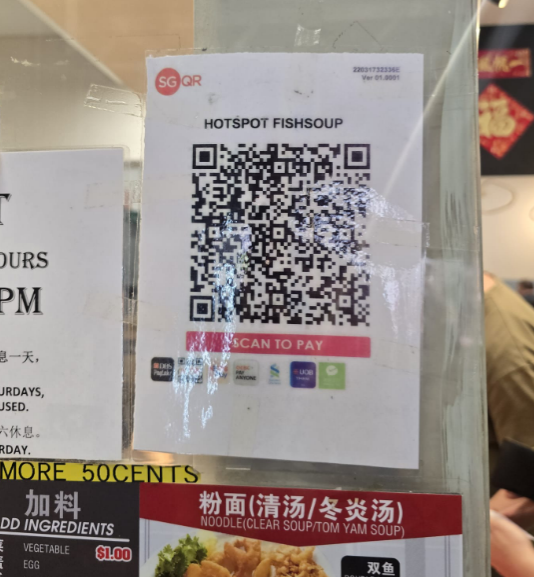
You will typically receive an instant payment confirmation once the transaction is complete.
It’s free for you.
Paying SGQR with International Wallets
If you are visiting Singapore, you’ll be happy to know that the SGQR system isn’t just for locals. To make life easier for tourists, SGQR has been expanding its reach through partnerships with regional and international e-wallets.
This means that many visitors can now scan and pay directly using their own familiar mobile payment apps, without needing to carry extra cash or set up a new local wallet.
Through Alipay+, SGQR now supports a range of popular overseas wallets such as Alipay (China), Touch ‘n Go (Malaysia), GCash (Philippines), KakaoPay (South Korea), TrueMoney (Thailand), and DANA (Indonesia).
Visitors from India can also pay at NETS QR-enabled merchants using UPI apps like BHIM, a link-up that NETS and India’s payments network have run since 2018. It’s limited to selected merchants rather than every SGQR sticker you see, so don’t assume it’ll work everywhere.
If you are from Thailand, you can open an account with KrungThai Bank and use its bank app to scan and pay directly with no extra cost.
When you use these wallets, the payment will be processed in Singapore dollars but charged in your home currency, making it quick and hassle-free.
Cashless Payment Linked Directly to Your Bank Account
If you have a bank account in Singapore, you will use either PayNow or PayLah! for cashless payments, depending on your bank.
PayNow
This is one of the most common and well-known cashless payment methods in Singapore, as it’s directly linked to the payee’s bank account. If you’re working in Singapore, there’s a good chance your paycheck already lands this way, and PayNow is the same rail most people use to split a bill or pay each other back.
PayNow is a free service provided by most banks in Singapore through their mobile banking apps. All you need to do is register for the service within your bank app or internet banking.
Some participating banks that provide PayNow services include:
Registration is not required for fund transfers via PayNow, but you will need to register if you wish to receive money through PayNow. With PayNow, you can send or receive money using:
- Your registered NRIC/FIN number (Singapore National ID)
- Your mobile phone number
- Your UEN (Unique Entity Number) for businesses – ACRA UEN
- Your own PayNow QR or SGQR code
- Your registered contact name in your phone
Payments are usually made in real time, and both the sender and receiver receive instant notifications upon successful transactions.
While it’s often used to make purchases at many merchants, PayNow is also extremely popular for instant peer-to-peer transfers, making day-to-day transactions quick and effortless. Plenty of tenants use it for paying rent straight to a landlord each month, no cheque required.
Tip: Although every bank sets its own transaction limit, you can also customize your own limit for extra protection.
PayLah!
PayLah! is a payment service offered by DBS/POSB Bank, although you don’t necessarily need to be their account holder to use it.
You will need to download the PayLah! app from your app store and link your DBS/POSB bank account if you already have one.
Otherwise, you can register using your personal details if you are a Singaporean or Permanent Resident without a DBS/POSB account.
The PayLah! app can also be used for various bill payments, including private hospitals, income tax, HDB loan instalments, telco bills, and more, as long as you have the relevant bill reference number.
Good to know: PayLah! is also connected to PayNow, meaning you can transfer funds through PayLah! to someone who doesn’t have a PayLah! account, as long as they are registered with PayNow.
Cross-Border PayNow: Sending Money to Thailand, Malaysia, and India
PayNow isn’t only for paying people inside Singapore anymore. The Monetary Authority of Singapore has linked PayNow with three overseas real-time payment systems, so you can send money abroad the same way you’d pay a friend back for lunch: with just a phone number.
- Thailand (PromptPay): Send using the recipient’s Thai mobile number. DBS, for example, caps transfers at S$1,000 per user per day with a S$10 minimum, and there’s no fee to send.
- India (UPI): Send to the recipient’s UPI ID or registered mobile number. Transfers land in near real time.
- Malaysia (DuitNow): Same idea, using the recipient’s Malaysian mobile number, with the exchange rate shown upfront before you confirm.
Not every bank has switched on every linkage yet, and daily limits vary by bank, so check the “overseas transfer” or “PayNow” section of your own banking app rather than assuming it’s available. Where it is, it beats a traditional international transfer on both speed and cost: what used to take a few working days and a cut of up to 10% in fees now lands in minutes for little or nothing.
Going the other direction, into Singapore from abroad, works differently since it isn’t routed through PayNow. Our guide on how to send money to Singapore covers the cheapest ways to do that.
NETS Payment
NETS stands for Network for Electronic Transfers. It is Singapore’s national debit payment network, established in 1985 by local banks such as DBS, OCBC, and UOB.
With NETS, you can make payments directly from your bank account using a debit card, a tap-to-pay contactless card, or NETS QR. To pay with NETS QR, you scan the code with your own bank’s app (DBS, OCBC, UOB, and most others support it), not a separate NETS app. The amount is deducted instantly from your linked bank account.
What makes NETS different from PayNow or PayLah! is that NETS typically works with a physical NETS card and doesn’t rely solely on your smartphone. However, NETS now also powers NETS FlashPay (a stored-value card) and NETS QR, which support both contactless and QR-based payments.
Previously, you could buy NETS cards from convenience stores, but now they are mostly available via Shopee Singapore.
PayWave
Since QR code payments are mainly for locals or Singapore residents who can open a bank account in Singapore, if you travel to Singapore or live here short-term, paying through PayWave is a more suitable option.
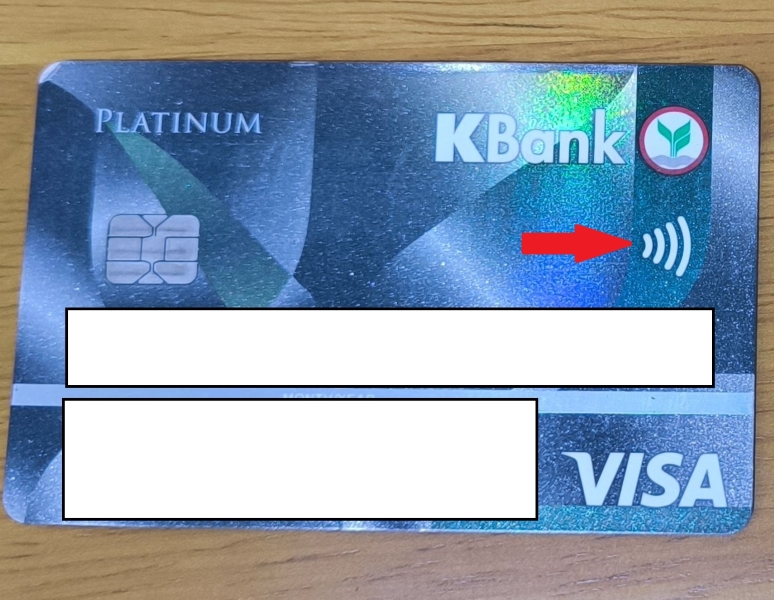
Originally, PayWave referred to Visa’s contactless payment technology, known for its simple tap-and-pay feature. Today, other card networks such as Mastercard also use similar technology, and most cashiers at merchants simply refer to it as “PayWave.”
PayWave is one of the most widely accepted payment methods at many point-of-sale terminals across Singapore. You can also use it to pay for public transportation.
Debit or Credit Cards with PayWave
Most debit or credit cards issued by banks from Singapore come with this feature enabled.
If you already have a Visa or Mastercard with the same feature issued in your home country (i.e. outside Singapore), you can also use it to make purchase transactions in Singapore. If it has a PayWave symbol, it means you can use it here.
Tip: When paying with PayWave using a credit card from your local bank account, it might involve some transaction fees and exchange rate fees. To save from that, you can get a debit card from a money service like Wise or Revolut. The exchange rate is much better than traditional banks.
PayWave Using Mobile Wallets
Using the same tap-and-pay concept, smartphones like Samsung and Apple now allow you to integrate your Visa card or Mastercard into their respective mobile wallets (i.e. Samsung Pay or Apple Pay).
Once your card is added, you can make payments simply by tapping or waving your phone near the terminal instead of tapping or waving your physical visa card or Mastercard.
How to Pay with PayWave
You only need to tap or wave your card near the reader terminal with the contactless symbol, no PIN entry required for small purchases. On the MRT and buses, this same tap runs through SimplyGo, the fare system that replaced EZ-Link for most commuters back in 2024. More on how that transition actually works below.

Paying for Public Transport: EZ-Link, SimplyGo, and Contactless Cards
The MRT and buses run on SimplyGo now, and it changed how most people tap in. You don’t need a dedicated travel card at all if you already carry a contactless Visa, Mastercard, or NETS card, or have one loaded into Apple Pay, Google Pay, or Samsung Pay.
Tapping In with a Contactless Bank Card
Just tap your card or phone at the fare gate or bus reader. No SimplyGo account, no registration, and no top-up needed. The reader deducts the fare straight from your bank account or credit line, the same way as any other contactless purchase.
Tip: Foreign-issued cards work too, but a small daily administrative fee (around S$0.60) applies on days you use one, on top of whatever your home bank charges for foreign transactions.
What Happened to EZ-Link
Since 1 June 2024, old stored-value EZ-Link adult cards and NETS FlashPay cards that haven’t been upgraded no longer work at the fare gates. If you still have one, you can upgrade it for free at any ticketing machine, or switch to a SimplyGo EZ-Link card instead, which looks the same but bills your fares to a linked payment method rather than deducting stored value on the spot.
Old EZ-Link and NETS FlashPay cards still work for ERP and parking charges, just not for MRT or bus fares anymore. Concession cards for students and seniors have also moved onto the SimplyGo system.
Other App-Based Wallet Payments
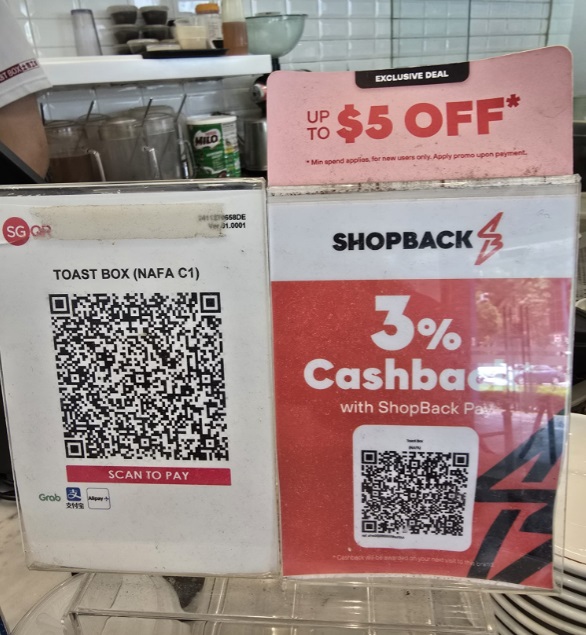
With smartphones now central to our daily lives, many payment apps have emerged in Singapore. Most of these use QR codes to enable the purchase transactions, and some are integrated into SGQR, while others operate with their own unique QR Codes.
Examples include popular mobile wallets like GrabPay, FavePay, ShopBack Pay and Singtel Dash.
I put a summary of each wallet in the table below for your easy reference:
| Application | Description | Best For |
| GrabPay | Mobile wallet integrated with the Grab app. The app itself can be used for rides, food delivery, and both online/in-store QR payment. | A great option if you already use multiple Grab services (rides, food delivery, etc.). Solid ecosystem with good promos & seamless integration. |
| ShopeePay | Enables payment in-store via NETS SGQR, online and through Shopee app. | Useful if you frequently make purchases in the Shopee App and if you want to stack both wallet and in-app promotions for extra savings. |
| FavePay | QR-based payment system through the Fave app. Fave scaled back several features in recent years (its buy-now-pay-later option was dropped), so check in-app that FavePay still works at a specific merchant before relying on it. | Attractive for dining and lifestyle spending, as many restaurants and independent merchants are Fave partners. |
| ShopBack Pay | Part of ShopBack’s cashback ecosystem. Link to your credit/debit card and allows QR payments at their participating stores to accumulate cash back. | Excellent when you want to maximise cashback rewards on both online and offline purchases. |
| Alipay/Alipay + | A China and region-focused cross border payment platform supported via SGQR. Also, through partnership, the local banks such as OCBC allow paying with Alipay + via their apps. | Useful particularly for tourists and users making overseas payment and cross-border transactions. |
| Singtel Dash | A multi-feature app for all payment, remittances, savings, investments, and insurance. Uses a Visa virtual cash and works with QR, PayNow, and FavePay | Good if you want more than just a payment wallet as saving, investing and remittance are in one app plus the flexibility of virtual Visa card and being able to use where Visa is accepted |
Consumer Fees Across Cashless Payment Method
Most of these fees are small change next to Singapore’s overall cost of living, but they add up if you’re topping up with a foreign credit card every week. In this table, I list out fees you should be aware of when using cashless payment here.
| Payment Method | Consumer Fees | Notes |
| NETS | No fee for users; small service fee may apply for some top-ups | Common for local retail and hawkers. Used for public transport, parking, vending, small retail |
| Bank Linked Payment | Free for personal transfers; minor FX fee for cross-border PayNow | Fast, real-time transfers via mobile number or QR |
| Card Linked Payment | No fee for local payments; 2.5% fee for credit card top-ups; withdrawal/transfer fees may apply | Integrated with loyalty rewards and promotions |
| Mobile Wallets | No fee for local payments; 2.5% fee for credit card top-ups; withdrawal/transfer fees may apply | Integrated with loyalty rewards and promotions |
| Others (including cross-border wallets) | 1%–3% FX conversion or cross-border fee; ATM withdrawal fees may apply | Useful for tourists and regional transactions |
Which Payment Method Should You Use?
With this many options, the real question isn’t which app to install, it’s which one to reach for in the moment. Here’s how to match the situation to the method.
| Situation | Best Method | Why |
| Tourist, first day, no Singapore SIM or bank account yet | Contactless Visa/Mastercard, or Apple Pay/Google Pay | Works everywhere PayWave is accepted, no setup required. |
| Paying at a hawker stall or small shop | Whichever app scans the SGQR sticker, or cash as backup | Some stalls skip cards and QR entirely; carry a little cash just in case. |
| Splitting a bill or paying a friend back | PayNow | Instant, free, and needs only a phone number. |
| Riding the MRT or bus | Contactless bank card, mobile wallet, or SimplyGo EZ-Link | No stored value to manage; fares deduct automatically. |
| Sending rent to a landlord | PayNow or a bank transfer | Real-time, and leaves a clean paper trail for both sides. |
| Sending money to family in Thailand, Malaysia, or India | PayNow’s cross-border linkage (PromptPay, DuitNow, UPI) | Minutes instead of days, and far cheaper than a wire transfer. |
| Long-term visitor without a local bank account | Multi-currency card (Wise, Revolut) | Works like a local debit card without opening a Singapore account. |
Trade Off of Cashless Payment Methods
While cashless payments in Singapore offer speed, convenience and sometimes attractive rewards, they also come with some trade-offs.
I personally feel that the ease of tapping or scanning can easily lead to overspending, and for some people the digital trail of these transactions raises some privacy concerns.
Consumers have also become heavily dependent on technology. A simple issue like a flat battery of your smartphone or network disruption can leave many of us stranded at the checkout counter.
Finally, as the country moves toward a fully digital economy, those who are less tech-savvy or unable to afford smartphones may be left behind. Cashless payments are efficient, but it pays to stay mindful, prepared and balanced.
Extra Tips: Always confirm the merchant’s name and the amount to be paid before proceeding with any payment transfer.
Cashless Options for Tourists in Singapore
As a tourist in Singapore, going cashless is not only convenient but also one of the easiest ways to get around and make purchases as most places accept cashless payment. It helps to get a local SIM card or eSIM first, since scanning QR codes and checking a PayNow-linked app both need a working data connection.
While SGQR is primarily for Singapore residents with a local bank account, tourists have several convenient alternatives. Note that PayNow and most local QR-based apps also require a Singapore phone number and bank account to set up, so short-term visitors are better served by the options below.
Here are the most practical options I recommend:
- Use your home country’s wallet payment if it’s supported by SGQR. You can check their website to find out more. This will be the most seamless way to pay for everything from your morning coffee to your shopping spree at Orchard Road.
- Use your international card (physical or mobile wallets). Singapore has one of the highest acceptance rates for contactless payment linked to your Visa and Mastercard, so this option works almost everywhere.
- Get a multi-currency or virtual card. Apps such as Wise. It’s a great option for tourists. You can read our review here. A multi-currency card is widely accepted in Singapore. You can use them for both online and in-store purchases, and even for public transport payments.
You should always carry some cash as well. You can withdraw money from an ATM in Singapore using your multi-currency card. This is important especially if you can’t pay via SGQR with your bank app. Some places, like certain shops in hawker centers, don’t accept cards. And it’s hawker centers if you want to try tasty authentic Singapore food.
Tip: Before arriving, make sure that your mobile wallet or other payment app is activated for international use and that your card supports foreign transactions.
Frequently Asked Questions
Do I need a Singapore bank account to pay cashless here?
No. A contactless Visa or Mastercard from your home bank, or a multi-currency card like Wise or Revolut, works at almost every PayWave-enabled terminal and on the MRT and buses. A Singapore bank account only becomes necessary for PayNow, PayLah!, and most SGQR-linked apps.
What’s the difference between PayNow and PayLah!?
PayNow is a shared service that most Singapore banks plug into; you send and receive money using a phone number, NRIC, or UEN through your own bank’s app. PayLah! is DBS/POSB’s own wallet app, which also connects to PayNow, so someone using PayLah! can still receive money from someone on a different bank’s PayNow.
Do I still need an EZ-Link card if I already have a contactless bank card?
No, not for transit. Since SimplyGo rolled out, tapping a contactless bank card or mobile wallet at the fare gate works exactly like tapping an EZ-Link card, and you skip the top-ups. An EZ-Link card is still useful if you’d rather not use your bank card for transit, or if you’re buying one for a child or a visitor without a card of their own.
Can tourists use PayNow?
Not directly. PayNow needs a Singapore bank account, NRIC/FIN, or a local mobile number to register, none of which a short-term visitor has. Tourists are better off with SGQR through a supported overseas wallet (Alipay+, for example), a contactless card, or a multi-currency card like Wise.
Is SGQR the same thing as PayNow?
No. SGQR is a single QR code label that multiple payment apps, including PayNow-linked bank apps and GrabPay, can scan. PayNow is one specific payment rail among several that an SGQR code can trigger.
Which cashless payment method has no fees?
PayNow, PayLah!, NETS, and most SGQR payments are free for the person paying. Fees mostly show up on credit card top-ups (around 2.5%), foreign transaction charges, or cross-border transfers (roughly 1-3%).
Can I send money from Singapore to Thailand or Malaysia through my banking app?
Yes, if your bank supports the PayNow-PromptPay (Thailand) or PayNow-DuitNow (Malaysia) linkage. Check the “overseas transfer” or “PayNow” section of your app; not every bank has switched it on for every corridor yet.
What happens if my phone battery dies mid-shop?
You’re stuck for QR and mobile wallet payments, which is why it’s worth carrying one physical card with PayWave enabled and a bit of cash, especially for hawker centres that don’t take cards at all.
Sources Cited
- Monetary Authority of Singapore – SGQR – Official confirmation that SGQR is jointly run by MAS and IMDA, and what it unifies.
- Association of Banks in Singapore – PayNow – Confirms PayNow registration via mobile number, NRIC/FIN, or UEN, and that PayNow is linked with PromptPay (Thailand), DuitNow (Malaysia), and UPI (India).
- Land Transport Authority – EZ-Link and NETS FlashPay transition to SimplyGo – Official date (1 June 2024) and terms of legacy EZ-Link/NETS FlashPay cards losing transit fare acceptance, and what still works (ERP, parking).
- SimplyGo – Contactless Bank Cards FAQ – Confirms no registration is needed to tap a contactless bank card at the fare gate, supported card schemes, and the foreign-card daily administrative fee.
- NETS – Ways to Pay – Describes current NETS QR, NETS contactless, and NETS card products.
- DBS – PayNow-PromptPay – Cited for one bank’s specific Singapore-Thailand PayNow-PromptPay transfer limit (S$1,000/day) and minimum (S$10).







 Deutsch:
 Français:
 Español: