This article will take approximately 13 minutes to read. Don't have the time right now? No worries. Email the ad-free version of the article to yourself and read it later!
I spent 10 days in Japan using Airalo’s eSIM instead of my usual roaming plan. Here is my honest experience with coverage, speed, pricing, and what to watch out for.
I just got back from a 10-day trip to Japan, and this time I decided to try something new. Instead of using international roaming from my local provider like I usually do, I switched to an eSIM. Specifically, I used Airalo.
I had tested Airalo once about a year ago, but this was my first time relying on it for an entire trip. If you are thinking about using Airalo for Japan, my experience should help you decide whether it is worth it.
Contents
- Key Takeaways
- TLDR
- Installation
- Activation
- Coverage
- Speed
- Price and Data
- How Airalo's Unlimited Japan Plan and 3 GB Daily Cap Work
- Data Tracking
- What I Did Not Like
- Keeping Your Home Number While Airalo Handles Data
- Fixing Airalo Connection Problems in Japan: APN, Restarts and Hotspot
- Overall Experience
- Will I Use It Again?
- Frequently Asked Questions
- Sources Cited
Key Takeaways
- Airalo works reliably in Japan with consistent coverage across Tokyo and rural areas like Lake Kawaguchi.
- Installation is fully in-app and takes just a few minutes; activate it before your trip and switch on when you land.
- Average speeds are around 20 Mbps, more than enough for maps, browsing, and streaming video on the go.
- The unlimited plan has a 3 GB daily cap, after which speed drops to 1 Mbps. Most casual users will not hit this.
- This is a data-only eSIM. You cannot make or receive calls, which can be inconvenient for car rentals or emergency contacts.
- Prices are competitive. A 10-day unlimited plan is around US$35 at the regular price, and a 15-day 10 GB plan is US$17.50. Prices change, so check before buying.
TLDR
Airalo works exactly as you would expect from a data eSIM. The connection is fast and stable, installation is easy, and I had no major issues throughout the trip. It is going to be my go-to option from now on. You can use this link to buy it with a 10% discount.

Installation
Installation is very easy. It is much easier than when I first tried Airalo a year ago. Back then, I had to scan a QR code separately. Now, everything is done directly inside the app.
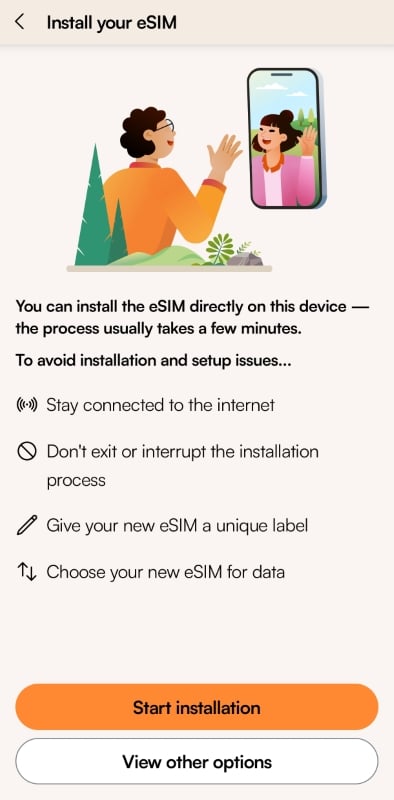
You just follow the instructions step by step, and the eSIM is installed within a few taps. One thing to note is that after installation, your phone will automatically switch to the Airalo eSIM. If you have not traveled yet, make sure you know how to switch back to your local SIM.
Activation
I installed the Airalo eSIM in advance before my flight. After installation, I switched back to my local SIM so I could stay connected before leaving.
Once I landed in Japan, I switched to the Airalo eSIM, and it connected almost immediately.
Tip: you need to turn on data roaming for the Airalo eSIM to access the internet.
Coverage
I spent nine days traveling around Tokyo and Lake Kawaguchi. I did not have any real connection problems during the trip.
There were a few brief disconnections here and there, but they only lasted a few seconds and were not an issue. I also lost connection when driving through long tunnels, which is normal. I have had the same experience with physical SIM cards as well.
Speed
I ran speed tests from time to time. On average, I got around 20 Mbps for both download and upload speeds.
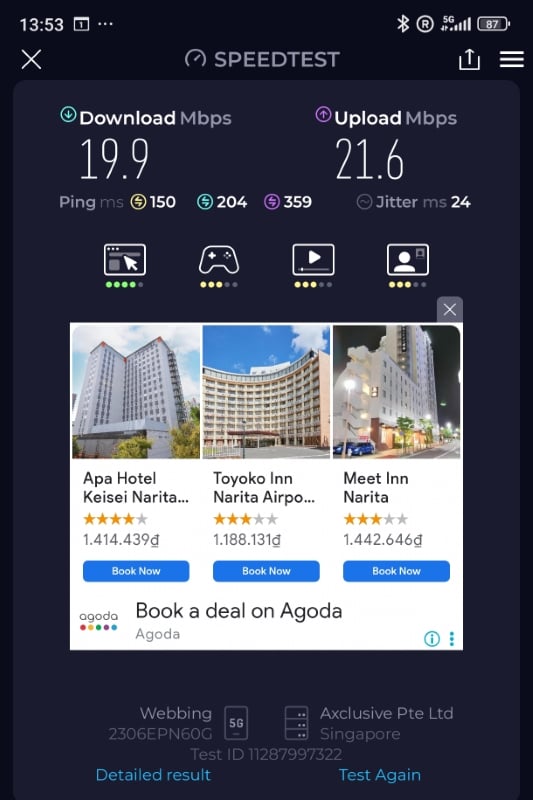
While that is not extremely fast, it is more than enough for normal use. I had no problem using Google Maps, searching on Google, checking Reddit and Facebook, or watching videos while on the train. Pages loaded quickly, and I never felt like I had to wait.
That said, I do not watch 4K videos on my phone, so keep that in mind.
Price and Data
I bought the unlimited plan during a Black Friday deal for US$26.25, which covered 10 days. For Japan, that is a very good price. Even though it is called an unlimited plan, there is a daily cap of 3 GB. After you reach that limit, the speed is reduced to 1 Mbps.
I never hit the daily cap. Unless you plan to tether your phone to a laptop all day or stream videos constantly, it is unlikely you will hit it either.
The price is also quite affordable. Even at the normal price of US$35, it is still much cheaper than unlimited data-only SIM cards from local providers, which usually cost around US$45. With Airalo, you can install it before your trip and start using it right after you land in Japan, saving the hassle of queuing to buy a SIM card.
In addition to the unlimited plan, there are many other plans and pricing options available. For example, their 15-day plan with 10 GB of data costs US$17.50.
You can see all of their plans with this link.
How Airalo’s Unlimited Japan Plan and 3 GB Daily Cap Work
Airalo’s unlimited eSIM gives you 3 GB of fast data every 24 hours. After that, your speed drops to 1 Mbps until the day resets. (Verified October 2026.)

- When it resets: 24 hours after your eSIM first connected to a network, not at midnight. If you landed at 3 PM, your day resets around 3 PM.
- At 1 Mbps: maps, messaging, email and basic browsing still work. Video streaming gets hard.
- Plan lengths: Airalo’s Japan page lists unlimited packages of 3, 5, 7, 10, 15 and 30 days.
- Network: the Japan eSIM shows SoftBank as its primary network, plus one more.
Airalo’s own estimates show how fast 3 GB goes if you stream a lot:
| Activity | Data used |
|---|---|
| 1 hour of SD Netflix | 0.7 to 1 GB |
| 2 hours of scrolling TikTok | About 1.6 GB |
| 45-minute HD Zoom call | About 1.1 GB |
| 30-minute WhatsApp or FaceTime video call | 90 to 240 MB |
So a day with two hours of Netflix and a couple of video calls can reach the cap. A day of maps, messages and train timetables won’t come close.
Data Tracking
Data tracking is one of the things I really like about Airalo. After installing the eSIM, you can check your remaining data directly inside the app. It is clear and easy to understand.

When I used roaming from my local provider in the past, I had to dial special codes to check usage. Airalo is much simpler.
Tip: sometimes you need to restart your phone after installing the eSIM for the data tracking to show correctly.
What I Did Not Like
There are a couple of things I did not like.
- Vietnamese in Search Result: First, sometimes when I searched on Google or tried to book activities on Klook or Trip.com, the results showed up in Vietnamese, with prices in VND. This might be because Airalo routes data through Vietnam, but I am not entirely sure.
- Data-only eSIM: Second, this is a data-only eSIM. You cannot make or receive phone calls using it. This can be inconvenient in some situations. For example, if you need to call your travel insurance company, you will need another option. When I rented a car in Lake Kawaguchi and they asked for a contactable phone number, I had to give them my hotel’s number instead. However, this is a main problem for most eSIM anyway, not just for Airalo.
Keeping Your Home Number While Airalo Handles Data
You can still get calls and texts on your usual number while the Airalo eSIM carries your data. Your phone just needs to keep both lines switched on. (Verified October 2026.)
- Check your eSIM’s Additional Information in the Airalo app to see whether the plan is data-only.
- Leave your main SIM or eSIM turned on, and set it as the default line for calls and texts.
- Keep the Airalo eSIM selected for mobile data.
- Turn on data roaming for your main line only if your home provider requires it for calls and texts.
Tip: calls and texts to your main line from abroad may cost roaming charges. Airalo suggests asking your home provider about its rates before you travel.
Fixing Airalo Connection Problems in Japan: APN, Restarts and Hotspot
Most connection problems come down to a setting. Run through these before you contact support. (Verified October 2026.)
- APN: some Airalo eSIMs need you to type in the APN by hand. In the Airalo app, go to My eSIMs, pick your eSIM, tap View details, then How to connect. If no APN is listed, the eSIM sets itself up. Type the APN exactly as shown, all lowercase.
- Restart: if data doesn’t connect right after you change the APN, restart your phone.
- Hotspot: you can share the connection if your phone and the network allow it. On iPhone, also enter the APN in the Personal Hotspot APN field. On Android, set the APN before you switch hotspot on.
- A site or app acting oddly: Airalo says eSIM data goes through a roaming platform, so some apps and websites may limit access. Airalo doesn’t block sites itself. Contact the app or site’s own support if one keeps failing.
Overall Experience
Aside from those two minor points, I am very satisfied with Airalo. It does exactly what an eSIM should do. The connection is reliable, installation is easy, and I did not run into any serious issues during my trip.

Will I Use It Again?
Yes. Not just for Japan, but for other countries as well. I also used Airalo in Hong Kong, and it worked well overall. The only issue I had was during installation, where I needed to change the APN settings based on instructions from their support team. Once that was done, everything worked fine.
Airalo is affordable, easy to install, and reliable. For me, that is exactly what I want from a travel eSIM.
If you want to try it, I recommend installing it in advance before your trip. Once you land at the airport, turn it on right away. If there is any issue, you can easily use the airport’s free WiFi to contact Airalo support and get it sorted quickly.
You can use this link to buy Airalo.
Frequently Asked Questions
Which network does Airalo use in Japan?
Airalo’s Japan eSIM shows SoftBank as its primary network and lists one more. Tap the network link on the plan page to see both before you buy.
How long are the unlimited Airalo plans for Japan?
Airalo lists unlimited Japan packages of 3, 5, 7, 10, 15 and 30 days. Pick the one that matches your trip, with a day or two to spare.
Can I use my phone as a hotspot with an Airalo eSIM?
Yes, as long as your phone and the network support it. Airalo’s help center says you may need to set the APN for the hotspot too.
Does an Airalo eSIM come with a phone number?
Not always. Check Additional Information in your eSIM details to see whether your plan is data-only. If it is, keep your main line on for calls and texts, as covered above.
Can I top up if I run out of days in Japan?
In many cases, yes. Airalo says you can often top up the same eSIM instead of buying a new one. Its renewals feature can also renew the package automatically when your eSIM has 10% of its data left.
Sources Cited
- Airalo, Japan eSIM page: unlimited package lengths, SoftBank as the primary network, top-ups and renewals.
- Airalo, Unlimited eSIM guide: 3 GB per 24 hours, 1 Mbps after the cap, the reset timing and data usage estimates.
- Airalo Help Center, calls and texts with a data-only eSIM: keep the main line on and set it as the default voice line.
- Airalo Help Center, APN settings: where to find the APN and how to enter it.
- Airalo Help Center, tethering: hotspot rules and the hotspot APN step.
- Airalo Help Center, app and website restrictions: eSIM data runs through a roaming platform, so some apps and sites may limit access.








 Français:
 Deutsch:
'/%3E%3Cpath%20fill='%23b2b2b2'%20d='M241%20382q0%2016%2017%2026%2017%2011%2042%2011t42-11q16-11%2017-26V269H241'/%3E%3Cpath%20fill='%239f7e00'%20d='M241%20379q0%2014%208%2023%209%209%2021%209%2014%200%2021-9%209-9%209-23V269h-59'/%3E%3Cpath%20d='M241%20339v-70h59v110q0%2014-9%2023l-6%205v-68h-15v72q-8%200-14-4v-68zm59%2040c0%2022%2015%2032%2029%2032%2021%200%2030-18%2030-32v-40h-59'/%3E%3Cpath%20fill='%239f7e00'%20d='M266%20277v5h2v12h-3v-5h2v-5h-9v5h2v5h-4v9h3v18h-5v10h34v-10h-5v-18h3v-9h-4v-5h2v-5h-9v5h2v5h-3v-12h2v-5zm42%20101q0%2010%206%2017%206%206%2015%207%2010-1%2016-7%206-7%206-17v-29h-43'/%3E%3Ccircle%20fill='%230044ad'%20cx='329.5'%20cy='372'%20r='6'/%3E%3Cellipse%20fill='%230044ad'%20cx='300'%20cy='340'%20rx='16'%20ry='21'/%3E%3C/svg%3E) Español:
Español: